Deepnote API
Run notebooks, control machines, manage projects and integrations, and build apps on top of Deepnote with the public REST API
The Deepnote API lets your own code do what you would otherwise do in the editor: run a notebook with new inputs and read its outputs, start and stop machines, keep a long-lived session for follow-up work, export and import projects, set up integrations, and search the workspace. Use it to put notebooks behind a product feature, wire them into a data pipeline, give an AI agent a place to compute, or manage a workspace as code.
Every endpoint, with its parameters and responses, is listed in the API reference. The guides below show how the pieces fit together.
What you can build
| Guide | What it covers |
|---|---|
| Running notebooks | Run a notebook with inputs, wait for it, read outputs as JSON, list past runs, and manage schedules |
| Interactive sessions | Keep a notebook's kernel alive between requests and submit follow-up runs or code against the same state |
| Machines | Start, stop and restart a project's machine, change its hardware, and set idle shutdown to control machine time |
| Projects and integrations | Export and import projects as .deepnote files, create and attach integrations, find where they are used, and search the workspace |
Deepnote also uses this API itself. The Deepnote CLI calls it for
run --cloud, schedule, sync and publish, and the Deepnote MCP server
gives AI agents the same capabilities. If one of those already does what you need, it is usually
the quicker route.
Authentication
Workspace admins create API keys under Settings & members → Security → API keys. Other members create them under API keys in their Account settings.
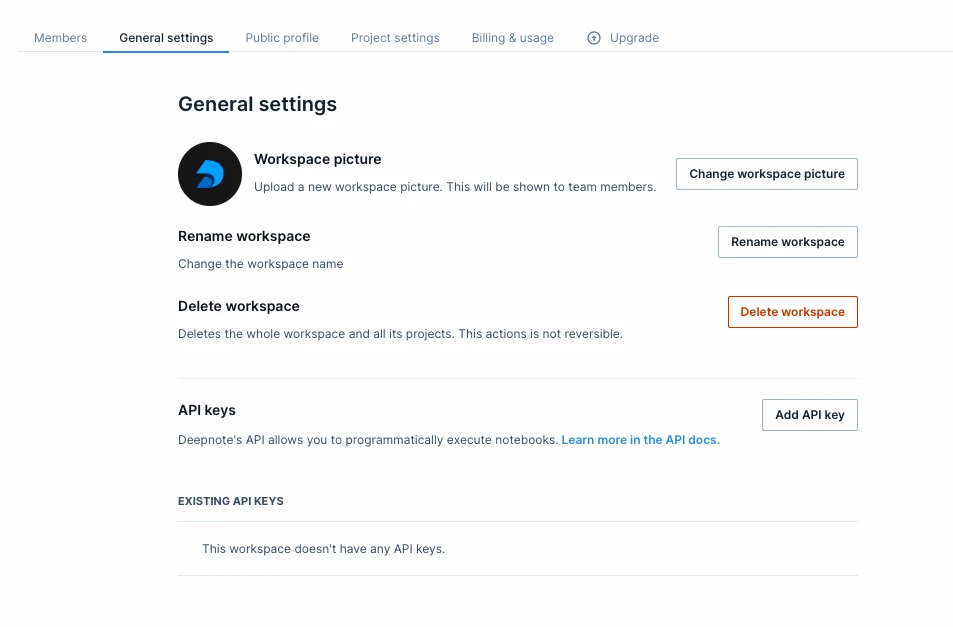
Send the key as a bearer token with every request:
export DEEPNOTE_TOKEN="<your-api-key>"

curl https://api.deepnote.com/v2/me \
  -H "Authorization: Bearer $DEEPNOTE_TOKEN"
GET /v2/me returns the key, the user it acts as and its workspace, which is a quick way to check
that a key works before you build on it.
Conventions
- Base URL:
https://api.deepnote.com/v2. Request and response bodies are JSON unless an endpoint says otherwise (project export and import use ZIP archives). - IDs come from the API itself or from the editor URL.
GET /v2/projectslists projects (filter withnameContains),GET /v2/projects/{projectId}lists a project's notebooks, integrations and files, and a.deepnotefile records its project and notebook ids. - Pagination:
GET /v2/projects,GET /v2/notebooks/{notebookId}/runsandGET /v2/audit-logstakepageSizeandpageToken, and returnpagination.nextPageTokenuntilhasMoreisfalse. Other list endpoints are not paginated. - Errors return
{ "message": "…" }with a standard status code.409means the request conflicts with the current state, for example the project is suspended, a machine is in the wrong state, or the plan does not allow that machine; the message says which. Other plan limits return403. - Rate limits return
429with aRetry-Afterheader giving the seconds to wait.
Apps that call the API as their viewer
Data apps and Streamlit apps call the API as the person viewing them rather than with your key. Deepnote hands the app a short-lived viewer token that can read a notebook's inputs, start detached runs, and read that viewer's own runs and their app data.
Related
- API reference: every endpoint, parameter and response
- Deepnote CLI: the same API from your terminal and CI
- Running notebooks in CI
- Deepnote MCP: connect AI agents to your workspace
- Scheduling and Run snapshots